


Live streaming is currently used for a variety of purposes, including self-expression, entertainment, and information dissemination. But have you ever wanted to create more creative content or offer viewers a new experience? One way to make your live streams more engaging, not only visually but also audibly, is to use a voice changer. This article will show you how to use a voice changer in your live streams to enhance creativity and entertainment.
Part 1: How can you make live broadcasts more creative?
Creativity is the most important element of a live broadcast. Using a voice changer can provide viewers with a new entertainment experience. For example, in a game livestream, you can embody a game character, or in a storytelling broadcast, you can use voice alterations to bring characters to life. With a voice changer, you can transform your voice into that of a robot, elf, fairy, or even a demon, leaving a strong impression on your viewers and entertaining them.
A voice changer can be an effective tool for raising the quality of your live streams, attracting more viewers, and making them look forward to your next broadcast.
Part 2: Top 4 Recommended Free Voice Changer Software
Here are some free voice changer software programs you can use to make your live streams more engaging.
Top Mediai Voice Conversion Site
TopMediai Voice Changer This is a simple and easy-to-use online tool that allows you to change your voice in real time, making it ideal for live streaming and voice chat. You can transform your voice into that of a robot, an elf, or other unique character, providing a new kind of fun for your audience during your streams.
How to use TopMediai Voice Changer
Step 1: Access TopMediai Voice Changer
First, visit the TopMediai official website.
Step 2: Click "Upload Audio"
Once you access the page, select "Upload Audio" and choose the audio file you want to convert.

Step 3: Select an audio filter
Next, you choose your favorite from over 1,000 voice filters available. There's a wide variety of filters to choose from, ranging from robotic voices to elf and musical-style voices.
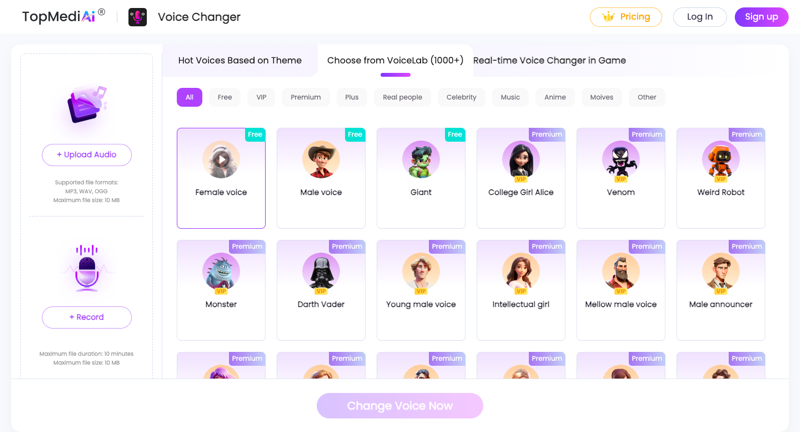
Step 4: Confirm the voice change
Once you've selected your voice filter, click "Change Voice Now" to complete the changes.
Now you can easily modify voices and create unique and fun sound effects. Additional features like speech recognition, text conversion, and AI cover are also available to further unleash your creativity. Try it out and you might discover even more interesting options!
Features
- Over 1,000 voice effects and filters.
- Simple user interface.
- It can be used online without installation.
Disadvantage
All-in-one video converter
Download videos with one click from YouTube, Facebook, Twitter, Instagram, NicoNico, TikTok, Reddit, Netflix, and other video sites. Lossless music converter compatible with Apple Music, Spotify, YouTube Music, SoundCloud, and more. Try it now!
- An internet connection is required.
MagicVox Voice Conversion Site

UnicTool MagicVox is a tool that allows you to modify your voice in real time, and it has a wealth of filters for use in games and live streams. With over 100 voice filters, you can choose from a variety of voices, including Hatsune Miku, Paimon, and female voices, making your games and streams more entertaining.
Features
- Approximately 125 types of voice filters.
- Customizing voice parameters.
- High compatibility with Twitch, Discord, and gaming platforms.
LingoJam Voice Conversion Site

LingoJam is a simple voice transformation tool that allows you to create various sounds by changing the pitch of your voice. While it doesn't support real-time voice transformation, it can transform recorded audio and add unique effects.
Features
- A simple and easy-to-use interface.
- It can be changed to various tones.
- Audio files can be uploaded and downloaded.
Media.io Voice Conversion Site

Media.io is an online tool that allows you to quickly modify audio. It offers a wide range of audio filters and enables real-time voice transformation. You can easily apply unique effects to game streaming and YouTube content creation.
Features
- Instantly change the voice.
- Multiple voice filters (robot, child, alien, etc.).
- Upload your audio file in any format.
Part 3: Frequently Asked Questions about Changing Audio in Live Broadcasts
1. What is an acoustic transducer?
A sound transducer (voice changer) is a device or software that can alter the pitch, timbre, and special effects of a voice. Using it, you can change a male voice to a female voice, or add interesting effects to a voice to enhance its entertainment value.
2. How do I use a sound changer during a live broadcast?
Select a sound changer in your live streaming software or streaming device and adjust the settings. Many streaming software programs also have built-in additional audio effects.
3. What are the advantages of using a voice changer in live streaming?
Using a voice changer can significantly enhance the entertainment value of your live streams and attract viewers. A variety of sound effects will make your streams more enjoyable and memorable.
4. What is Mirrativ Voice Changer?
Mirrativ is a platform that allows users to change their voice in real time during live streams, providing viewers with a new and exciting experience.
結論
Using a voice changer during live streaming can add freshness and creativity to your content, capturing your audience's attention. It offers endless possibilities for live broadcasts across various formats, including gaming, storytelling, and sharing daily life. Incorporate a voice changer to create more creative and engaging live streams!





