


Snapchat is a very appealing social media app that constantly releases new updates and features. One of the most interesting features is its "voice changer function." With this, you can share videos with a fun and unique voice, along with cute face stickers and filters.
Fortunately, Snapchat's voice filters are easy to use without the need for third-party tools. This article will explain in detail how to change your voice on Snapchat, so please take a look!
Part 1: How to change your voice with Snapchat's built-in voice changer
Since the launch of Snapchat, voice filters have been a huge source of enjoyment for users. You can add voice filters to already recorded videos or videos shot in real time, offering endless possibilities for fun.
To use Snapchat's voice changer, first update the app to the latest version, and then search for "Voice Filters" in the search box.
How to change your voice on Snapchat
Step 1 Launch Snapchat, double-tap the front camera, and adjust it so that your face is clearly visible on the screen.
Step 2 Press and hold your finger on your face until a white grid appears on the screen. This will activate Snapchat's Lens feature.
Step 3 Select "Video Filters" to the right of the shutter button.

Step 4 The red line filling the circle indicates that recording has started. Speak into the microphone and enjoy the voice filter activating.
Step 5 Press and hold the "Record button" until recording is finished, then tap the "Tap to try" button from the several options that appear and select a voice filter.

Step 6 Choose your favorite voice filter and press the blue "Share" button to share your snap with that voice.

Part 2: Top 5 Recommended Voice-Changing Snapchat Filters
If you want to enjoy Snapchat's voice filters, you can't miss these 5 filters!
Teddy Bear with Stars filter
If you want to transform into an adorable teddy bear, this filter is perfect! With fluffy ears, glasses, and a few simple adjustments, you can instantly become a cute teddy bear.
Cursed Pumpkin Filter
Perfect for Halloween season, this filter transforms you into a cursed pumpkin. Your mouth moves when you speak, but your eyes remain fixed, creating a unique effect.
Baby voice changer
When you want to make someone smile, nothing is more effective than a baby voice filter. You can soothe your friends or girlfriend when they're tired with a cute baby voice.
All-in-one video converter
Download videos with one click from YouTube, Facebook, Twitter, Instagram, NicoNico, TikTok, Reddit, Netflix, and other video sites. Lossless music converter compatible with Apple Music, Spotify, YouTube Music, SoundCloud, and more. Try it now!
Colorful Crown
If you want to transform yourself into a clown, a colorful clown is perfect. With a red nose and colorful makeup, it might not only change your appearance but also instantly change the mood of the person you send it to.
Crazy Voice Filter
Using the Crazy Voice Filter, your voice changes as if you're speaking through a microphone from another dimension. When you speak, your face and voice will change so much that you'll sound like a completely different person, and the person you send it to is sure to be surprised!
Part 3: Changing your voice on Snapchat using a third-party voice changer
Besides using Snapchat's built-in voice changer, you can also change your voice using third-party tools. Here are some excellent tools:
TopMediai Voice Changer
TopMediai Voice Changer This powerful real-time voice-changing software offers users a wide range of voice effects. Easily enjoy role-playing in games and on social platforms like Snapchat while changing your voice to create creative content.
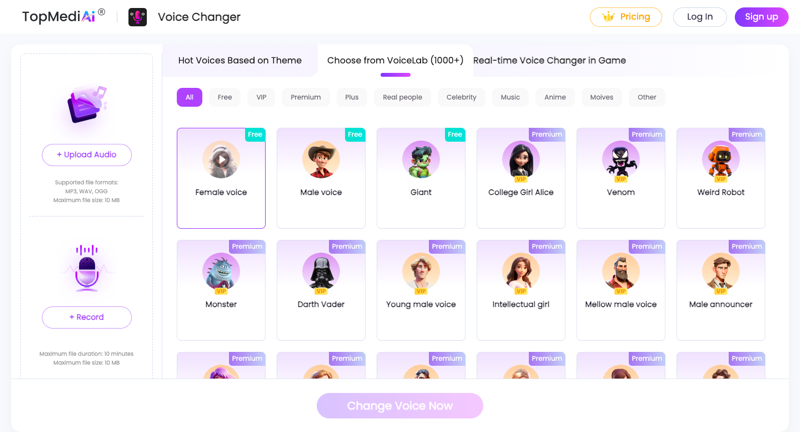
Features:
- Real-time voice modification is possible on social media platforms.
- Equipped with a rich sound effects library, it can meet a variety of needs.
- It supports a wide range of apps and platforms, including Zoom, Discord, and Snapchat.
- High-quality audio processing delivers clear and natural sound quality.
Voice Changer.io
VoiceChanger.io is an online voice changer that offers unique voice filters, including cat, robot, and Darth Vader sounds. Its easy-to-use interface allows you to apply filters to online recorded audio.

Features:
- A simple user interface.
- It offers multiple voice filters (cat, robot, Darth Vader, etc.).
Anonymous Voice Changer
Anonymous Voice Changer is a simple and easy-to-use voice changer that lets you easily adjust the pitch, echo, speed, and resonance of your voice. This app is available for installation on the App Store and Google Play, and you can apply filters to your recorded voice and share it on Snapchat.

Features:
- Multiple audio filters.
- Adjusting pitch, echo, speed, and resonance.
- With its simple interface, anyone can easily use it.
結論
Understanding how to change your voice on Snapchat is the first step to expanding your enjoyment. This article covers methods using Snapchat's built-in voice changer, TopMediai Voice Changer We've offered a variety of options, including third-party tools like [tool name]. It's fun to surprise and amuse your friends with voice filters, isn't it? So, let's go ahead and change your voice in a unique way and share it on Snapchat!





